
QuoteWerks Support Portal
How can we help you today?
Change SQL search code on Product Lookup Window Search fields

Steve Siggs
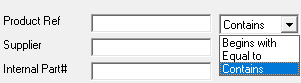
Mfg. Part # (renamed "Product Ref" in screenshot below) is using '%criteria%' because you have "Contains" selected.
The dev teem adding these dropdown options to other fields would give you what you want.
Thanks Steve,
My understanding is the drop down only refers to the Item description field.
I tested it and regardless if its set to 'Begins with' or 'Contains' ( I dont have the 'Equal to'), the resulting sql in the manufacturer part number always returns LIKE '%criteria%', so there doesnt seem to be any link to the drop down at all, and this being the case, and since searches can be done independently of the item description field thats why I assumed it would be a simple change for the other fields.
Steve, I see youir point now :-), completely didnt notice the box next to Manufacturer, I agree with you!
Stuart Bell
It would be great if the SQL behind the search fields was consistent.
ManufacturerPartNumber search includes the '%' before and after the search criteria bringing back all instances of 100 LIKE '%100%'
However the internalpartnumber field does not and only brings back items that start with 100 LIKE '100%'
The only fields that have full LIKE '%Criteria%' are
Item description, Keyword and Manufacturer Part all the rest have LIKE 'Criteria%'
The manual workaround is entering a % directly on the field, eg %100, but its a pain to do.
Seems a simple change and would make it alot easier to find things quickly
Thanks